What Is Majestic? Features, Pricing and How It Helps Link Building
Majestic focuses on link data alone, with Trust Flow, Citation Flow and Fresh and Historic indexes, with plans from $49.99 a month checked November 2026.
Majestic is a link-only SEO tool built around its own backlink index, with Site Explorer, Trust Flow and Citation Flow at its centre. It does not try to cover rank tracking or content tools, and that narrow focus makes its link data easy to read.
It fits link builders, agencies and SEO teams who want deep link data and already have other tools for keywords and audits.
TL;DR
- Majestic starts at $49.99 a month in USD for the Lite plan, or £39.99 a month in GBP before VAT, with a 7-day money-back offer on Lite and Pro.
- Trust Flow and Citation Flow score a site from 0 to 100, with Trust Flow for link quality and Citation Flow for link quantity.
- Site Explorer covers the Fresh Index, updated several times a day, and the Historic Index on Pro and API plans.
- There is no free trial stated, and you can use a free checker demo plus free Trust Flow and Citation Flow through plugins.
Quick facts
| Fact | Detail |
|---|---|
| What it does | Link-only backlink index with Site Explorer, Trust Flow, Citation Flow and link reports |
| Best for | Link builders, agencies and SEO teams who want deep link data |
| Starting price | $49.99 a month in USD, or £39.99 a month in GBP before VAT, checked November 2026 |
| Free option | Free checker demo, plus free Trust Flow and Citation Flow through plugins |
| Website | majestic.com |
| Checked | November 2026 |
What Majestic does for link building
Find sites that link to your competitors
Site Explorer lets you check any domain and see its backlinks, referring domains and anchor text. A referring domain is one website that links to you, even if it links from several pages.
You can compare your domain with a competitor and find sites that link to the rival, which gives you a prospect list based on real links rather than guesses.
For example, a SaaS site can check three rival domains in Site Explorer and collect the blogs and resource pages that link to more than one of them. The team can then sort those prospects by Trust Flow and start with the sites that score highest.
That short list is often stronger than a long list built from a keyword search alone.
The list can include old links from pages that no longer cover the topic. You need to open each prospect and check that the page is still live and still relevant before you send a pitch.
Judge link quality with Trust Flow and Citation Flow
Trust Flow is Majestic 0 to 100 score for the quality of links pointing to a site, while Citation Flow is the 0 to 100 score for the quantity of links pointing to a site.
A site with high Trust Flow and moderate Citation Flow often has fewer links from stronger sources, while a site with high Citation Flow and low Trust Flow often has many links from weaker sources.
You can use that pair to sort prospects before you spend time on outreach, and you can also run a quick check with our backlink checker before you pay for a full report.
For example, a link builder can compare two blogs in the same niche and pick the one with higher Trust Flow even when the other blog has more total links. The check takes a few minutes and it can stop a week of outreach to a site that adds little value.
Topical Trust Flow adds one more layer, because it scores a site across more than 800 topic pools and shows whether its links fit your niche.
Trust Flow and Citation Flow are Majestic ratings and Google does not use them as ranking factors. You still need to read the linking page and check its relevance before you ask for a link.
Find links that share the same sources
Clique Hunter finds sites that link to several domains you enter, so you can see which sites link to a group of competitors at once. That is useful when you want a prospect list that is already warm, because those sites link to more than one site in your niche.
Compare Sites does a similar job for two or more domains, and it shows the overlap in their link profiles in one view.
For example, an agency can enter four client competitors into Clique Hunter and find ten blogs that link to all four. The team can then pitch those ten blogs first, because they clearly cover the topic and they link to similar tools.
That focus saves time, because the team does not have to sift through hundreds of single links to find the shared ones.
Clique Hunter shows the overlap, and it does not tell you why a site linked or whether the link still fits. You should read each linking page and check its context before you add the site to a prospect list.
Check old links with the Historic Index
The Fresh Index is updated several times a day and it shows recent links, while the Historic Index shows older links that may no longer be live. Pro and API plans include both indexes, while Lite includes the Fresh Index only.
That split matters when you want to see a full link history, because a site may have gained useful links years ago that still shape its profile.
For example, a team can check a competitor in the Historic Index and find a resource page that linked to it three years ago. The page may still be live, and the team can pitch it with a fresh resource or a link insertion, which is a link added to an existing page rather than a new post.
That old link is a clue, and it is worth a check even when the page looks dated.
Historic data can include links that are long gone, so a link in the Historic Index does not prove a live link today. You should open the page and confirm the link is still there before you count it as a prospect.
Check many domains at once
Bulk Backlink Checker lets you check many domains in one run instead of opening each one by hand. That helps when you have a long prospect list and you want Trust Flow, Citation Flow and link counts for each site. You can sort the results, drop the weakest sites and keep the strongest ones for outreach.
For example, a link builder can load 200 prospects from a gap check and run them through Bulk Backlink Checker in one go. The team can then keep the top 40 by Trust Flow and start outreach with that short list. That saves hours, because no one has to open 200 separate reports to get the same scores.
Bulk checks give you scores and counts, and they do not show the context of each link. You still need to open the best prospects and read their pages before you send a pitch.
Majestic pricing
Majestic pricing starts at $49.99 a month in USD for the Lite plan, or £39.99 a month in GBP before VAT, and rises to $399.99 a month in USD for the API plan.
Annual billing lowers the GBP monthly equivalent to £33.33 for Lite, £66.66 for Pro and £266.66 for API, with USD prices listed as $49.99, $99.99 and $399.99 a month. Prices were checked November 2026 on the Majestic pricing page.
| Plan | Monthly price | Annual equivalent |
|---|---|---|
| Lite | $49.99 a month, £39.99 a month before VAT | £33.33 a month before VAT |
| Pro | $99.99 a month, £79.99 a month before VAT | £66.66 a month before VAT |
| API | $399.99 a month, £319.99 a month before VAT | £266.66 a month before VAT |
If you take the Pro plan on monthly billing, you pay $99.99 a month for 20 million analysis units, Fresh and Historic indexes and 30,000 Site Explorer rows. Lite gives you 1 million units, Fresh Index only and 5,000 rows, while API gives you 100 million units and 50,000 rows.
Compare the result with our backlink pricing database before you set a budget for outreach.
Where Majestic fits in a link building workflow
- List your main competitors and check them in Site Explorer to find sites that link to them.
- Sort prospects by Trust Flow, Citation Flow and Topical Trust Flow to keep the strongest and most relevant sites.
- Use Clique Hunter and Compare Sites to find blogs that link to several competitors at once.
- Check the short list with Bulk Backlink Checker and drop the weakest sites.
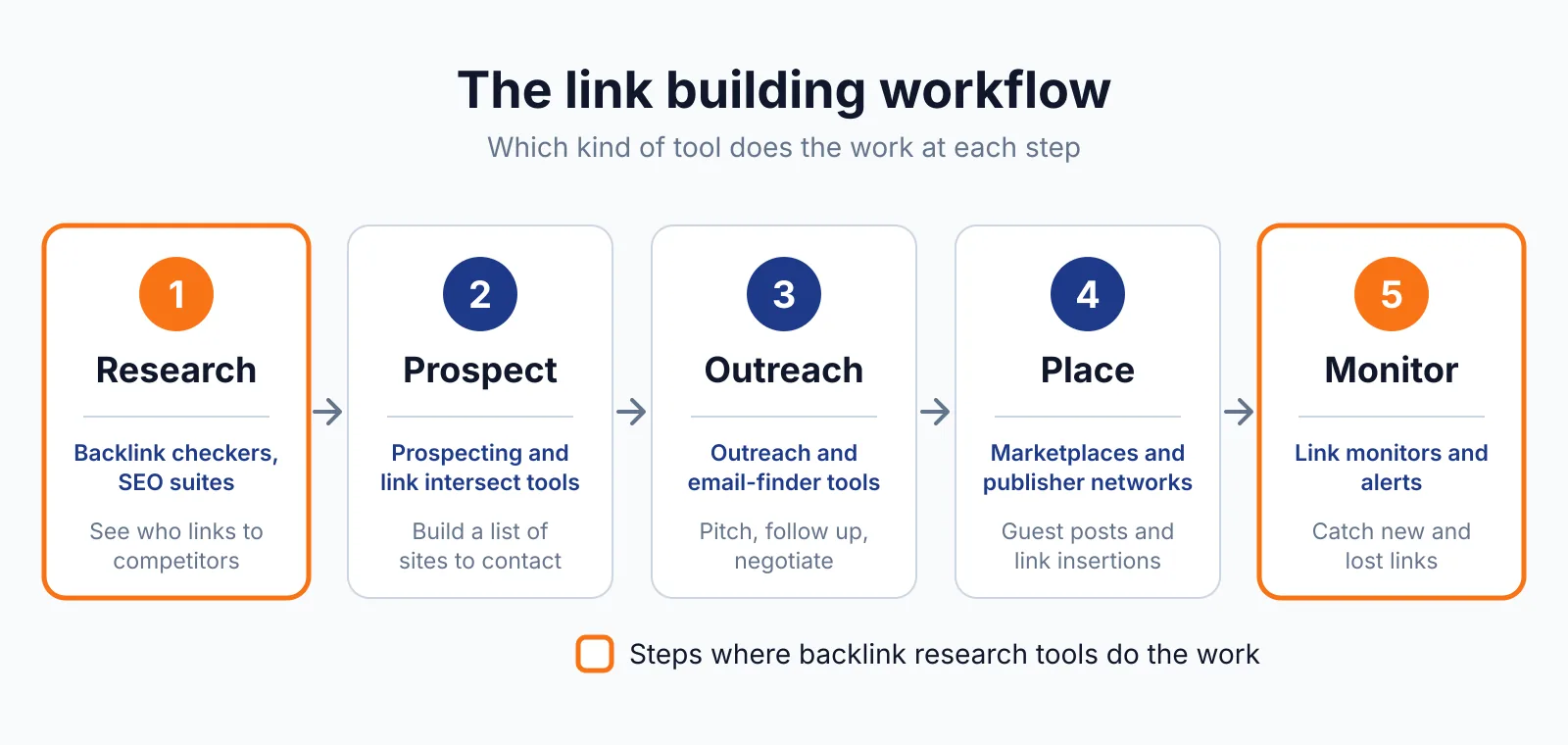
- Pitch the best sites with our link building outreach approach, then track gained and lost links in the Fresh Index.
Majestic does not send outreach emails or write your content for you. You still need a writer, an editor and a person who replies to site owners, and you should read the Google spam policies before you chase links from low-quality sites.
Pick Majestic if
- You want deep link data without a large set of extra tools.
- You need Trust Flow and Citation Flow to sort prospects by quality and quantity.
- You want Fresh and Historic indexes to see old and new links.
- You check many domains and want bulk reports.
Not a fit if
- You need rank tracking, keyword research and audits in the same login.
- You want a free trial before you pay for a plan.
- You need built-in outreach tracking.
- You only need a single backlink check each month.
Alternatives
If Majestic feels too narrow, compare it with Semrush on the Semrush pricing page and Moz Pro on the Moz Pro pricing page. Semrush adds more tools in one login, while Moz Pro adds simpler link scores.
| Tool | Why people switch | Pricing |
|---|---|---|
| Semrush | Wider tool set with outreach tracking | Check current pricing on their site |
| Moz Pro | Simpler link scores and a lower starting price | Check current pricing on their site |
| Ahrefs | Large backlink index and a familiar workflow | Check current pricing on their site |
FAQ
Does Majestic offer a free trial?
No free trial is stated on the pricing page, and Lite and Pro come with a 7-day money-back offer. You can use a free checker demo and free Trust Flow and Citation Flow through plugins before you pay.
What is the difference between Trust Flow and Citation Flow?
Trust Flow scores link quality from 0 to 100, while Citation Flow scores link quantity from 0 to 100. A site can have high quantity and low quality, so you should read both scores together before you judge a prospect.
Which Majestic plan includes the Historic Index?
Pro and API plans include the Fresh Index and the Historic Index, while Lite includes the Fresh Index only. Pro gives you 20 million analysis units and 30,000 Site Explorer rows, and API gives you 100 million units and 50,000 rows.
How often is the Fresh Index updated?
The Fresh Index is updated several times a day, so it shows recent links soon after they appear. The Historic Index covers older links, and you should open a page to confirm a historic link is still live.
Next step
Start with our free SEO tools to check a backlink profile or a price before you commit to a paid plan. If you want help with outreach, tell us about your site on our contact page and we will reply with next steps.

The BacklinkPrice Team researches backlink prices, publisher sites and link building tools. We check prices and plans against each provider's own pages and date them, so you know how current the numbers are.
More from BacklinkPrice TeamRelated guides